Product photography
Bring: Product photos, approved details and a visual brief.
Review: Product and lifestyle image candidates.
AI product photography · Model and workflow guide
Compare ai product photography options for product scenes built around a supplied reference. Review source requirements, candidate details and current Promptha support.
Compare model options →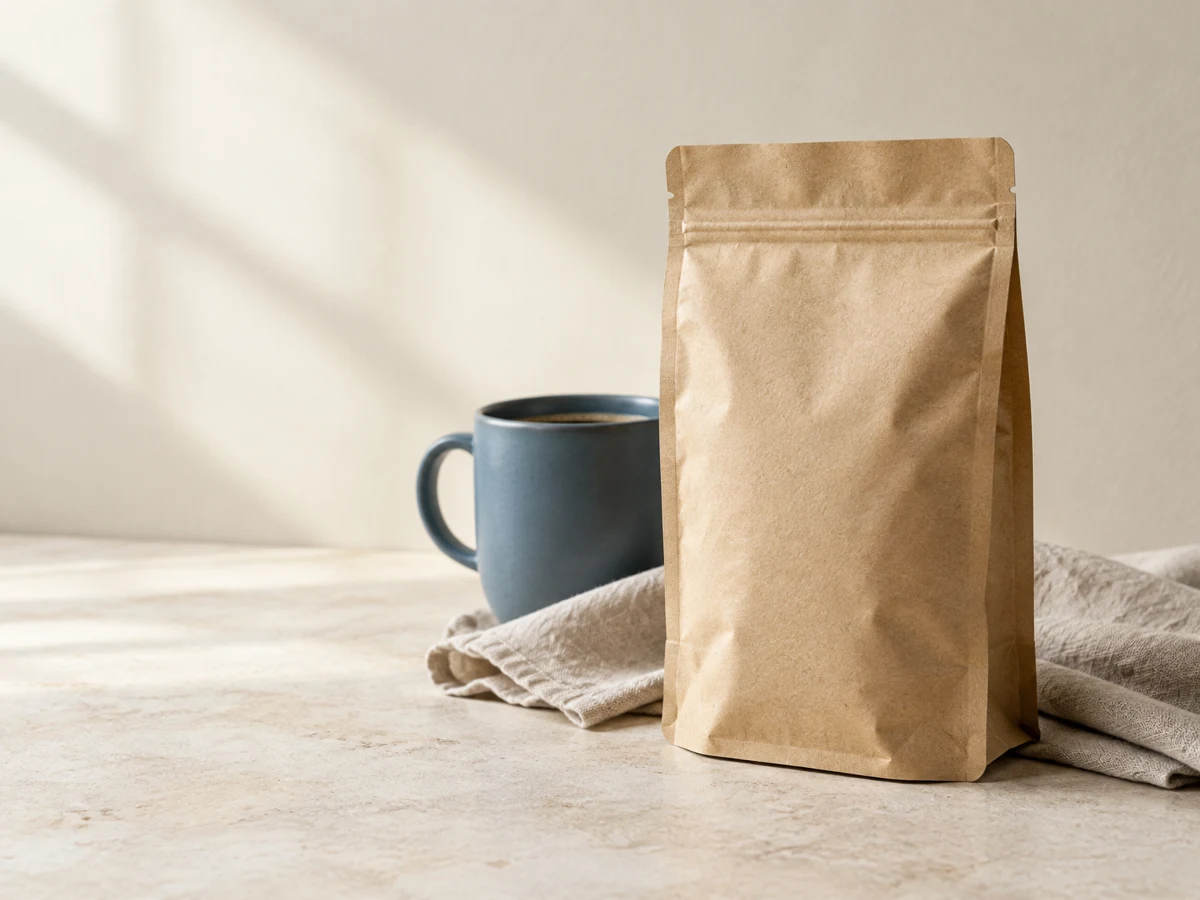
A fictional coffee product, styled with warm light, a ceramic cup and space for your campaign copy. Created from the brief below.
GPT Image 2.5 Flare · Generated in PrompthaCreate a believable editorial product photograph for a fictional coffee launch. One unbranded upright kraft coffee pouch sits just right of center on pale limestone; a matte blue ceramic cup is behind and slightly left of it, with a folded natural linen cloth at the base. Show the complete pouch silhouette and base, fine paper fibers, soft folds and realistic contact shadows. Use a three-quarter camera view at product height, gentle morning window light from the upper left, a softly receding cream wall, restrained blue and warm neutral accents, and enough depth of field to inspect the pouch edges. Reserve the left quarter as calm negative space for live page copy. No printed labels, readable text, logos, watermarks, extra pouches or hands. This is an illustrative fictional product, not evidence of real packaging accuracy.
Bring: Product photos, approved details and a visual brief.
Review: Product and lifestyle image candidates.
Place this selected coffee bag beside a ceramic cup in morning side light. Preserve its visible product details where possible.
Illustrative workflow brief. It is not a tested model result or a universal API input; supply each model’s required source fields separately.
Ordered by proposed catalog placement, not benchmark performance. Check each entry’s integration status.
Detailed product imagery and image edits
34 credits · ≤ $0.10 provider estimate
Conservative USD provider estimates and Promptha credits for the stated examples. Exact inputs and settings receive a fresh quote before submission.
Explore linked prompts, profiles and templates →
Adapter and price policy are implemented; workspace activation and live output verification are separate. Provider features may exceed the controls exposed in Promptha.
Registered action adapters. Check workspace availability; Preview results still need live output verification.
Provider schema fields are not a list of enabled Promptha controls.
seed, width, height, prompt, resolution, aspect_ratio, input_images, output_format, output_quality, safety_tolerance
Required by schema: prompt
Prepare a request in Chat, add any required source and review it. This does not start generation.
Prepare Create image in Chat →Prepare Edit image in Chat →Product photography and material detail
10 credits · ≤ $0.03 provider estimate
Conservative USD provider estimates and Promptha credits for the stated examples. Exact inputs and settings receive a fresh quote before submission.
Explore linked prompts, profiles and templates →
Adapter and price policy are implemented; workspace activation and live output verification are separate. Provider features may exceed the controls exposed in Promptha.
Registered action adapters. Check workspace availability; Preview results still need live output verification.
Provider schema fields are not a list of enabled Promptha controls.
seed, width, height, prompt, resolution, aspect_ratio, input_images, output_format, output_quality, safety_tolerance
Required by schema: prompt
Prepare a request in Chat, add any required source and review it. This does not start generation.
Prepare Create image in Chat →Prepare Edit image in Chat →Prepare Edit image in Chat →Single-image creation and exact-source whole-image revisions
4 credits · ≤ $0.012 provider estimate
Conservative USD provider estimates and Promptha credits for the stated examples. Exact inputs and settings receive a fresh quote before submission.
Explore linked prompts, profiles and templates →
Adapter and price policy are implemented; workspace activation and live output verification are separate. Provider features may exceed the controls exposed in Promptha.
Registered action adapters. Check workspace availability; Preview results still need live output verification.
Provider schema fields are not a list of enabled Promptha controls.
prompt, quality, user_id, background, moderation, aspect_ratio, input_images, output_format, openai_api_key, number_of_images, output_compression
Required by schema: prompt
Prepare a request in Chat, add any required source and review it. This does not start generation.
Prepare Create image in Chat →Prepare Edit image in Chat →Detailed final image candidates
20 credits · ≤ $0.06 provider estimate
Conservative USD provider estimates and Promptha credits for the stated examples. Exact inputs and settings receive a fresh quote before submission.
Explore linked prompts, profiles and templates →
Adapter and price policy are implemented; workspace activation and live output verification are separate. Provider features may exceed the controls exposed in Promptha.
Registered action adapters. Check workspace availability; Preview results still need live output verification.
Provider schema fields are not a list of enabled Promptha controls.
prompt, image_size, aspect_ratio, output_format, safety_filter_level
Required by schema: prompt
Prepare a request in Chat, add any required source and review it. This does not start generation.
Prepare Create image in Chat →Product scenes and everyday image edits
23 credits · ≤ $0.067 provider estimate
Conservative USD provider estimates and Promptha credits for the stated examples. Exact inputs and settings receive a fresh quote before submission.
Explore linked prompts, profiles and templates →
Adapter and price policy are implemented; workspace activation and live output verification are separate. Provider features may exceed the controls exposed in Promptha.
Registered action adapters. Check workspace availability; Preview results still need live output verification.
Provider schema fields are not a list of enabled Promptha controls.
prompt, resolution, image_input, aspect_ratio, image_search, google_search, output_format
Required by schema: prompt
Prepare a request in Chat, add any required source and review it. This does not start generation.
Prepare Create image in Chat →Prepare Edit image in Chat →Detailed compositions and image-led creative work
50 credits · ≤ $0.15 provider estimate
Conservative USD provider estimates and Promptha credits for the stated examples. Exact inputs and settings receive a fresh quote before submission.
Explore linked prompts, profiles and templates →
Adapter and price policy are implemented; workspace activation and live output verification are separate. Provider features may exceed the controls exposed in Promptha.
Registered action adapters. Check workspace availability; Preview results still need live output verification.
Provider schema fields are not a list of enabled Promptha controls.
prompt, resolution, image_input, aspect_ratio, output_format, safety_filter_level, allow_fallback_model
Required by schema: prompt
Prepare a request in Chat, add any required source and review it. This does not start generation.
Prepare Create image in Chat →Prepare Edit image in Chat →Proposed recipes to configure and validate before offering them as runnable workflows.
Product photos in a selected setting. Supply the source material, review a model-specific request and inspect the resulting candidate before delivery.
Suggested stages: Product photography.
Fashion campaign image candidates. Supply the source material, review a model-specific request and inspect the resulting candidate before delivery.
Suggested stages: Product photography → Image editing.
Packaging concepts for design review. Supply the source material, review a model-specific request and inspect the resulting candidate before delivery.
Suggested stages: Design & typography → Product photography.
Food scenes with controlled framing. Supply the source material, review a model-specific request and inspect the resulting candidate before delivery.
Suggested stages: Product photography.
Jewelry image candidates for detail review. Supply the source material, review a model-specific request and inspect the resulting candidate before delivery.
Suggested stages: Product photography.
A product color variation. Supply the source material, review a model-specific request and inspect the resulting candidate before delivery.
Suggested stages: Image editing → Product photography.
A product-placement image candidate. Supply the source material, review a model-specific request and inspect the resulting candidate before delivery.
Suggested stages: Image editing → Product photography.
Product ad components for assembly. Supply the source material, review a model-specific request and inspect the resulting candidate before delivery.
Suggested stages: Product photography → Video generation → Soundtracks → Voice generation.
Use the model guide to check supported inputs. Keep the source available, compare the complete candidate and continue from the exact version you choose. Credit pricing and live output verification are required before activating new integrations.
The starting material for this capability is: Product photos, approved details and a visual brief. The intended result is: Product and lifestyle image candidates. Check the selected model's exposed input contract before preparation. A visually related source may still be incompatible in media type, size or the role it plays in the request.
Review these concrete details: product geometry, label accuracy, lighting consistency. Keep the approved brief and original source available. Inspect the complete candidate rather than judging a thumbnail, single frame or short excerpt. Record the exact version you choose and keep rejected alternatives when they explain the decision.
Read Nano Banana 2 integration guideSome related operations have registered integration guides. Inspect each action and workspace activation; registration does not guarantee that all provider controls or the complete capability workflow are available.
A proposed Generator recipe still needs saved configuration, compatible stages and reviewed inputs. Inspect the quote and the real output handling before treating a multi-step process as a supported deliverable. Export and native Studio compatibility belong to the chosen artifact, not the name of the capability.
Inspect catalog support for this capabilitySome related operations have registered adapters. Check the specific model guide, required sources and live workspace choices. The capability label does not guarantee every proposed workflow is enabled.
Product photography: Product geometry, Label accuracy, Lighting consistency. Compare the complete candidate with its approved brief and source before choosing it.